Using ZSA with Zkool
ZSA can be used from two perspectives: through the wallet app, or through the GraphQL API for applications.
User perspective: wallet driven
Prerequisites
- Use a database name containing
zsaand connect the wallet the ZSA testnet LWD server:https://zsa.methyl.cc - Get tZEC test funds from the faucet to pay fees at the ZSA faucet
Step by step
- Open Settings.
- Tap the folder icon next to the database name. The app schedules the database manager to open on the next launch, then manually restart the app.
- In the Database Manager, tap Create a new database.
- Enter a name containing
zsa(e.g.zsaorzsa-testnet). The name is what selects the ZSA testnet network. - Set a password if desired; leave blank for no password.
- Tap on the new item in the list to open the database.
- In Settings, set the Server URL to
https://zsa.methyl.cc. - Create an account with the "+" button.
The account is empty until it is funded with tZEC from the faucet and synchronized.
Issue an asset
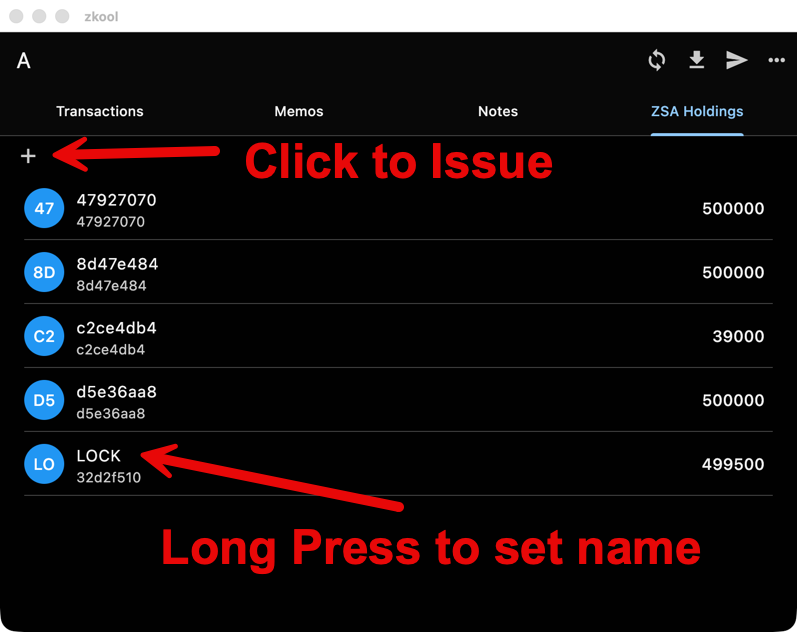
In the wallet, issue an asset by giving it a name and an amount. The amount must be an integer, asset amounts cannot have decimals. The asset is identified by the issuer's validating key and the hash of its name. In the current implementation, every asset is finalized at issuance, reissuance is not yet supported.
Important
You MUST NOT issue the same token name from the same wallet twice. Currently, it breaks the server.
Asset names
The protocol does not include asset names, only the asset ID. The name is therefore only known by its issuer. When you receive an asset, you can assign your own name to it in the wallet, and it does not have to be the name the issuer gave.
Transfer assets
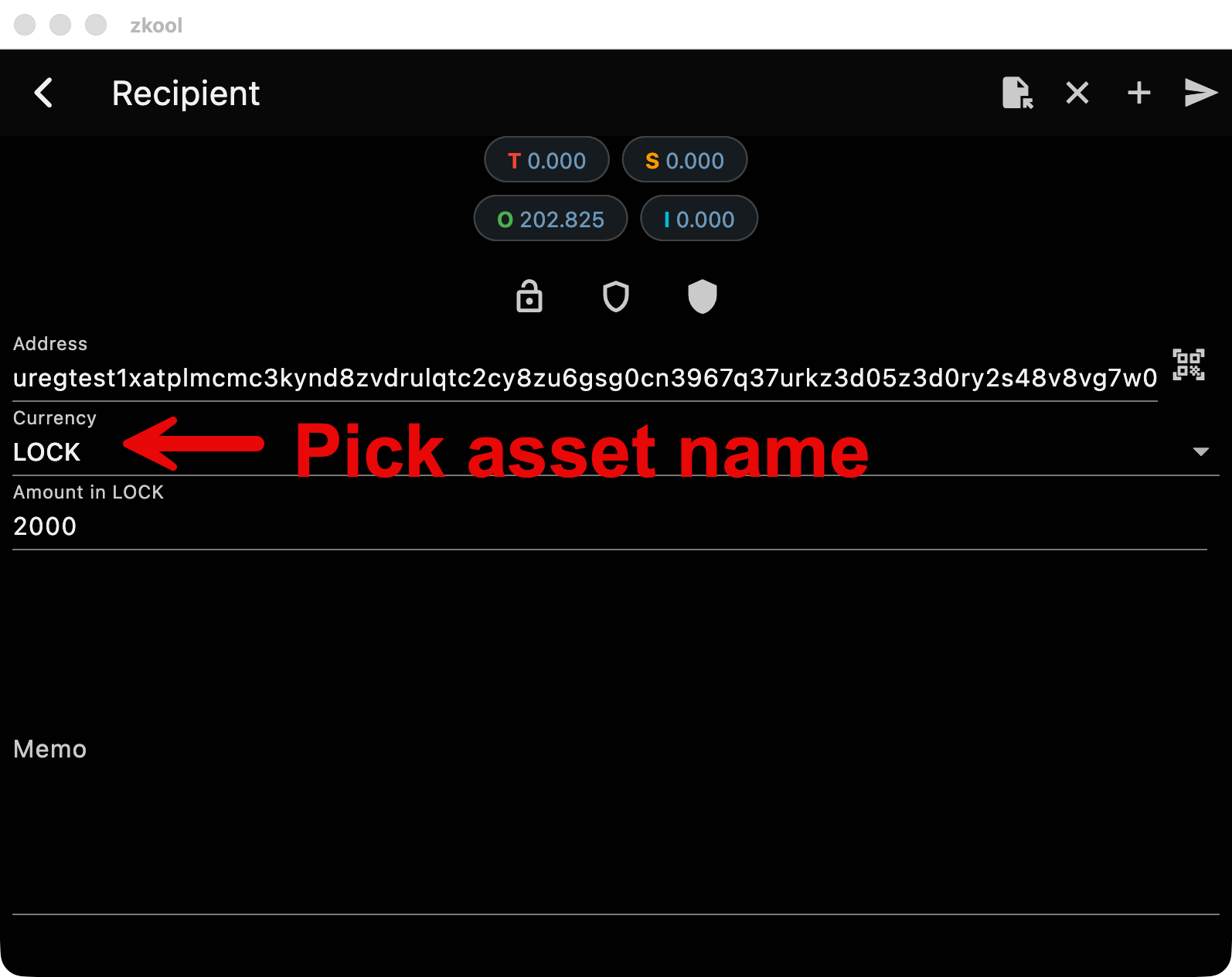
Once issued, the asset appears in the wallet's balances and can be sent to any shielded address, just like a ZEC payment. Except that, as with issuance, amounts must be integers. Transfers stay confidential, while the total supply remains publicly verifiable because issuance notes are plaintext.
Developer perspective: API driven
zkool_graphql exposes wallet functionality: accounts, synchronization, issuance, and payments, over GraphQL. Build it from source and connect it to a ZSA-enabled lightwalletd (see the build guide).
Setup
cd rust
cargo b -r --features=graphql --bin zkool_graphql
Configure the server with the path to the database, the ZSA testnet lightwalletd URL, and the listening port:
db_path = "zkool.db"
lwd_url = "https://zsa.methyl.cc"
port = 8000
# coin type: 3 selects the ZSA testnet network
coin = 3
GraphIQL is an interactive test page embedded in the server, available at http://localhost:8000/graphiql.
Core flow
1. Create an account
mutation {
  createAccount(newAccount: {
     name: "Issuer"
     useInternal: true
     key: ""
     aindex: 0
  })
}
2. Synchronize it
mutation {
  synchronize(idAccounts: [1])
}
3. Check the balance
The ZEC balance comes from balanceByAccount:
query {
  balanceByAccount(idAccount: 1) {
    height
    total
  }
}
Asset balances are a different query: assets returns one entry per asset with its unspent balance (ZEC is included as well):
query {
  assets(idAccount: 1) {
    idAsset
    assetName
    assetDescHash
    finalized
    balance
  }
}
4. Issue an asset
mutation {
  issueAsset(idAccount: 1, assetName: "taz", amount: "1000", firstIssuance: true, finalize: true)
}
The mutation returns the transaction ID of the issuance transaction. The amount is an integer string: asset amounts cannot have decimals.
In the current implementation, firstIssuance and finalize must both be true.
Important
You MUST NOT issue the same token name from the same wallet twice. Currently, it breaks the server.
5. Pay fees and transfer
Fees and payments use the regular pay mutation, which takes a list of recipients with addresses and amounts (see Sending Funds):
mutation {
  pay(idAccount: 1,
  payment:  {
     recipients:  [{
        address: "uregtest..."
        amount: "0.0001"
     }]
     srcPools: 7
  })
}
To transfer a custom asset, set assetDesc on the recipient. It can be the asset name or a hex prefix of the asset desc hash; omit it (or use "") for ZEC. Asset amounts are integers, not decimal amounts:
mutation {
  pay(idAccount: 1,
  payment:  {
     recipients:  [{
        address: "uregtest..."
        assetDesc: "taz"
        amount: "1000"
     }]
  })
}
6. Name a received asset
Because the protocol does not transmit asset names, the name has to be set locally. Use setAssetName with the asset ID returned by the asset queries:
mutation {
  setAssetName(idAsset: 1, name: "taz")
}