Zkool Documentation
  • What's new

    • Since 6.35
    • Since 6.34
    • Since 6.32
    • Since 6.31
    • Since 6.30
    • Since 6.29
    • Since 6.28
    • Since 6.27
    • Since 6.26
    • Since 6.25
    • Since 6.24
    • Since 6.23
    • Since 6.22
    • Since 6.21
    • Since 6.20
    • Since 6.19
    • Since 6.18
    • Since 6.17
    • Since 6.16
    • Since 6.15
    • Since 6.14
    • Since 6.13
    • Since 6.12
    • Since 6.11
    • Since 6.10
  • Guides

    • Getting Started
    • Account Manager
    • Synchronization
    • Account
    • Addresses
    • Payments
    • Other features
    • Building Zkool from source
  • Recipes

    • Edit an Account
    • Supported Key Types
    • Cold Wallet
    • Ledger
    • Troubleshooting Synchronization Issues
    • Folders
    • Contacts
    • Database/Wallet Files
    • Using TOR
    • Security
    • Kiosk Zkool
    • Mempool
    • Payment URI
    • Locking Notes
    • Mainnet, Testnet, Regtest
    • Export to CSV
  • Categories / Reports

    • Overview
    • Examples
    • Categories
    • ZEC Price
    • Charts
  • MultiSig Accounts / FROST

    • Overview
    • Key Generation
    • Signing a Transaction
  • GraphQL

    • GraphQL API
    • Build
    • GraphIQL
    • Account Management
    • Synchronization
    • Balance
    • Transaction History
    • Receiving Funds
    • Sending Funds
    • Unconfirmed Funds
    • Notifications / Subscriptions
  • ZSA

    • Zcash Shielded Assets
    • Testnet
    • Using ZSA with Zkool
  • Coin Weighted Voting

    • Overview
    • How to vote
  • Cloud Vault

    • Overview
    • How to use
  • Zcash tech

    • Shielded Pools
    • Bitcoin Data Model
    • Transaction Graph
    • Privacy

This release adds the official Ledger Zcash app and fixes several transparent address problems.

Released 12 September 2026.

The official Ledger app

Zkool supported Ledger devices through the Zondax Zcash app. It now also works with the official Zcash app from Ledger, which is the default choice in the New Account form; the form has a selector for the two apps. An account made with the official app has a transparent and an Ironwood pool, its viewing key is imported from the device after you approve it on screen, and transactions are signed on the device in the v6 format. These accounts always use internal change.
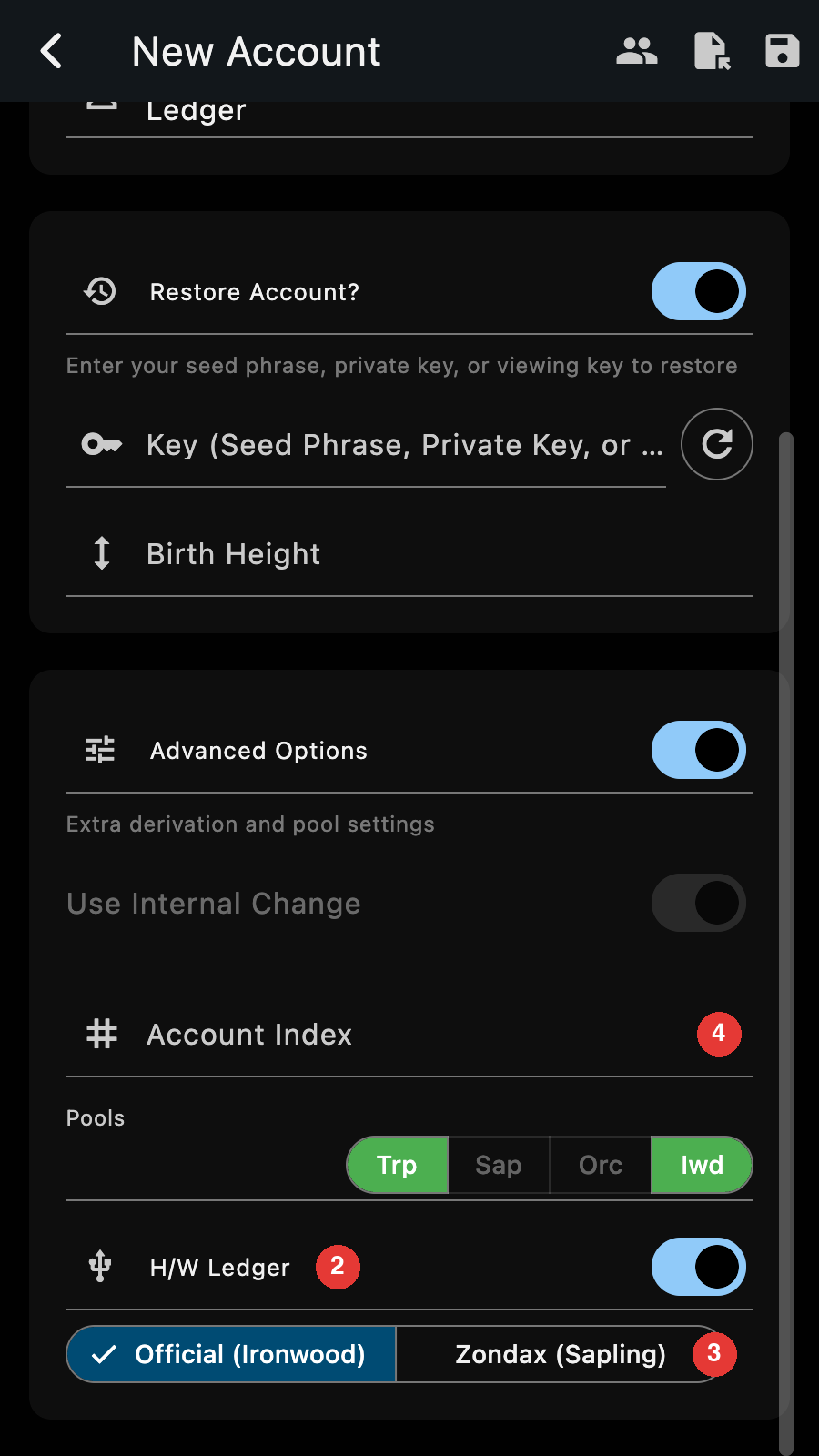
Importing a Ledger account

See the Ledger recipe.

Transparent addresses

  • The scan for used transparent addresses only stops after a run of consecutive unused addresses. It used to stop early on a sparse pattern and miss later addresses.
  • The next address index moves past the addresses the scan found, so a new address is never one that was already used.
  • Every transparent address has its change counterpart, and change goes to that address instead of a freshly derived one. Existing accounts are completed on open.

Also

  • Tap the pool balances on the account page to collapse them into one row. The choice is remembered.
  • Unshield All includes the Ironwood pool.
  • A newly restored account is selected and synchronized right away.
  • Setting a positive autosync interval restarts autosync at once.
  • Error messages can be selected and copied.
  • The ballot shows its proposals immediately rather than after the vote tree is loaded.
  • GraphQL: createAccount accepts a Ledger account, and signTx and pay sign on the device.
Last Updated: 11/6/26, 12:26 AM
Contributors: hhanh00
Prev
Since 6.30
Next
Since 6.28