Contacts are Zkool's address book: a name, one or more Zcash addresses and a note. They belong to the wallet database, not to an account, so every account can pay a contact and sees its name in its history.
The "Contacts" option of the account manager menu opens the contact list.
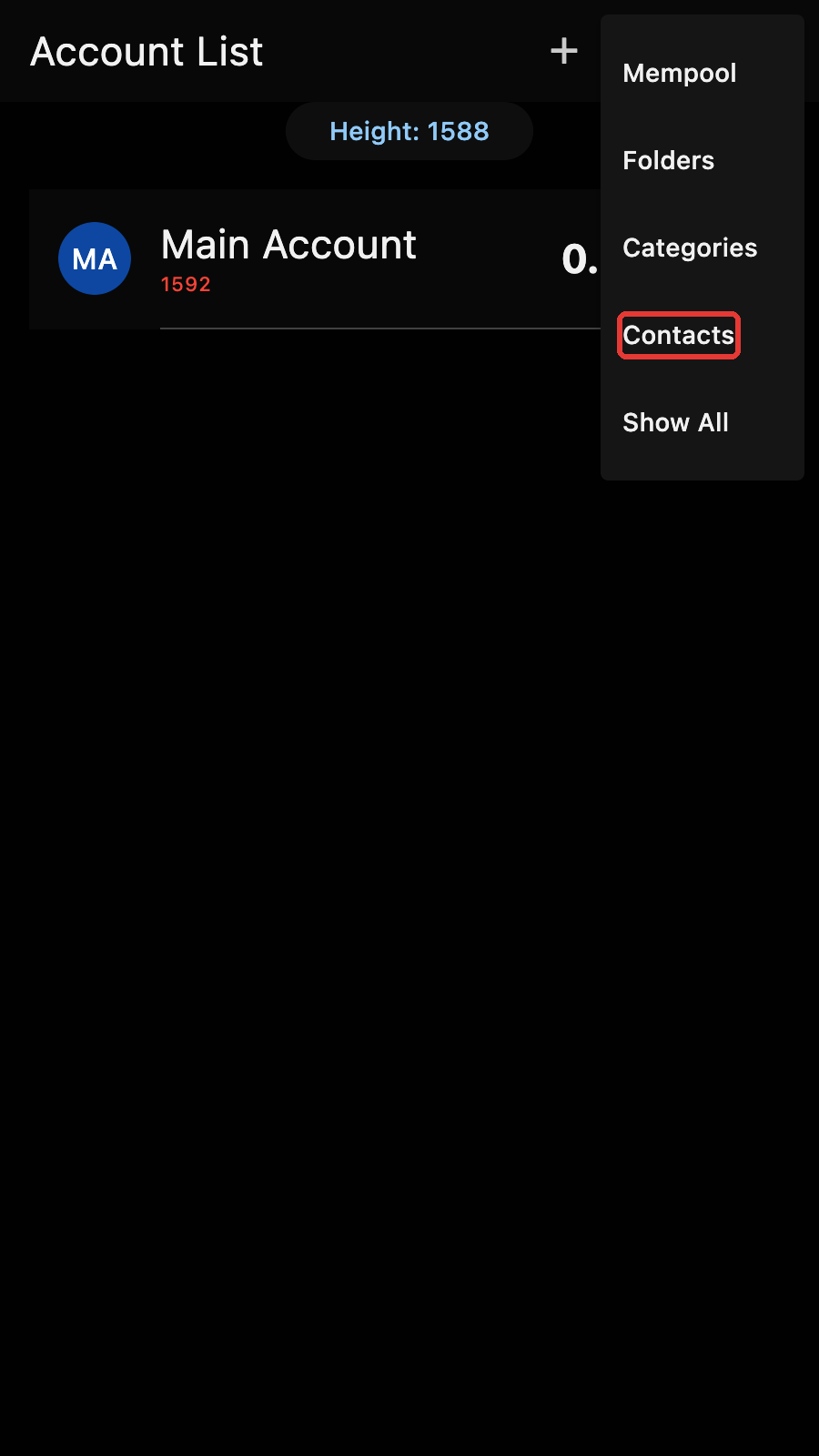
The contact list
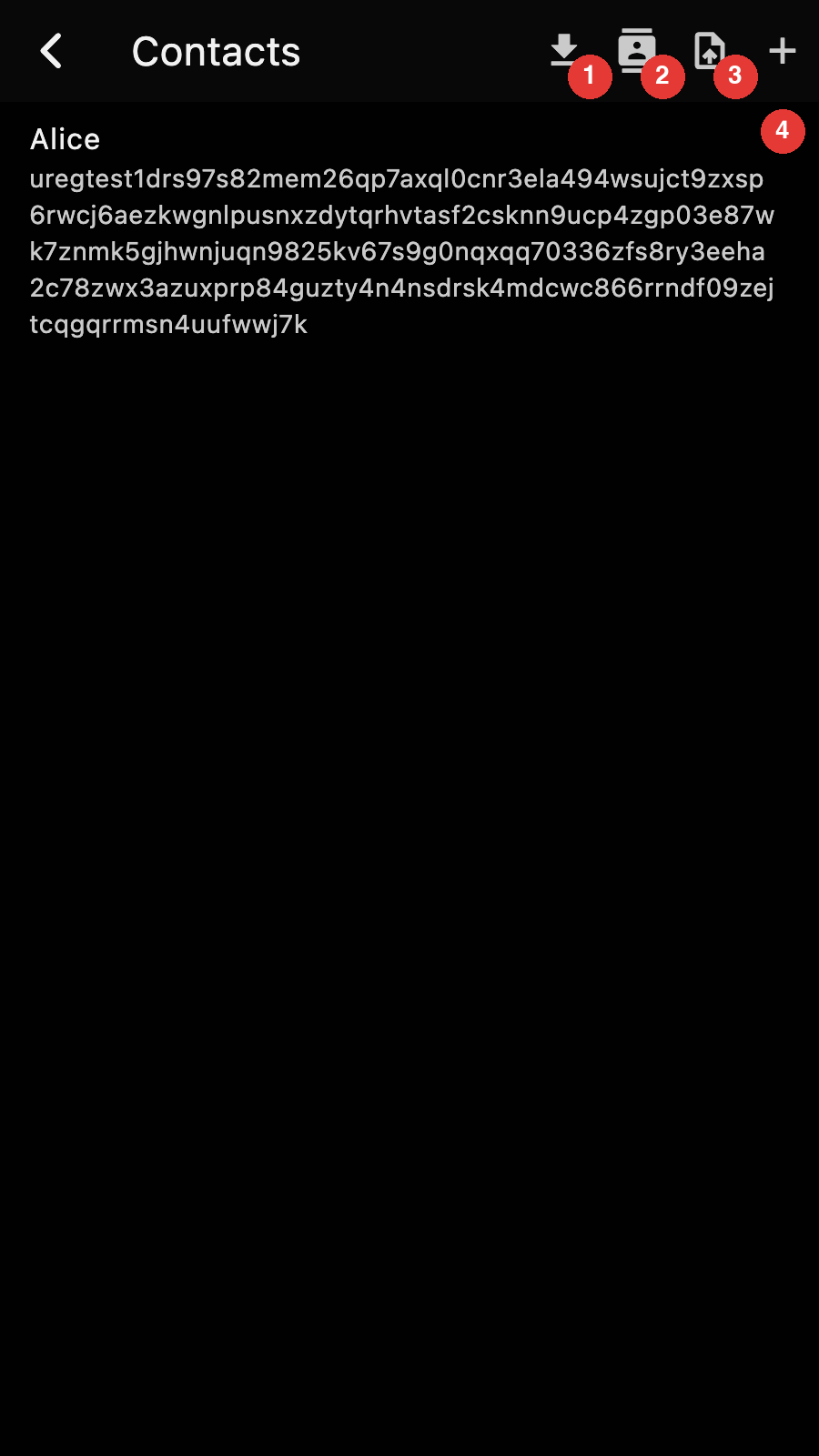
- Import contacts from a vCard file
- Import contacts from the phone's address book
- Export every contact as a vCard file
- New contact
Each row shows the name and the first address of a contact. Tap on a row to edit it.
Adding or editing a contact
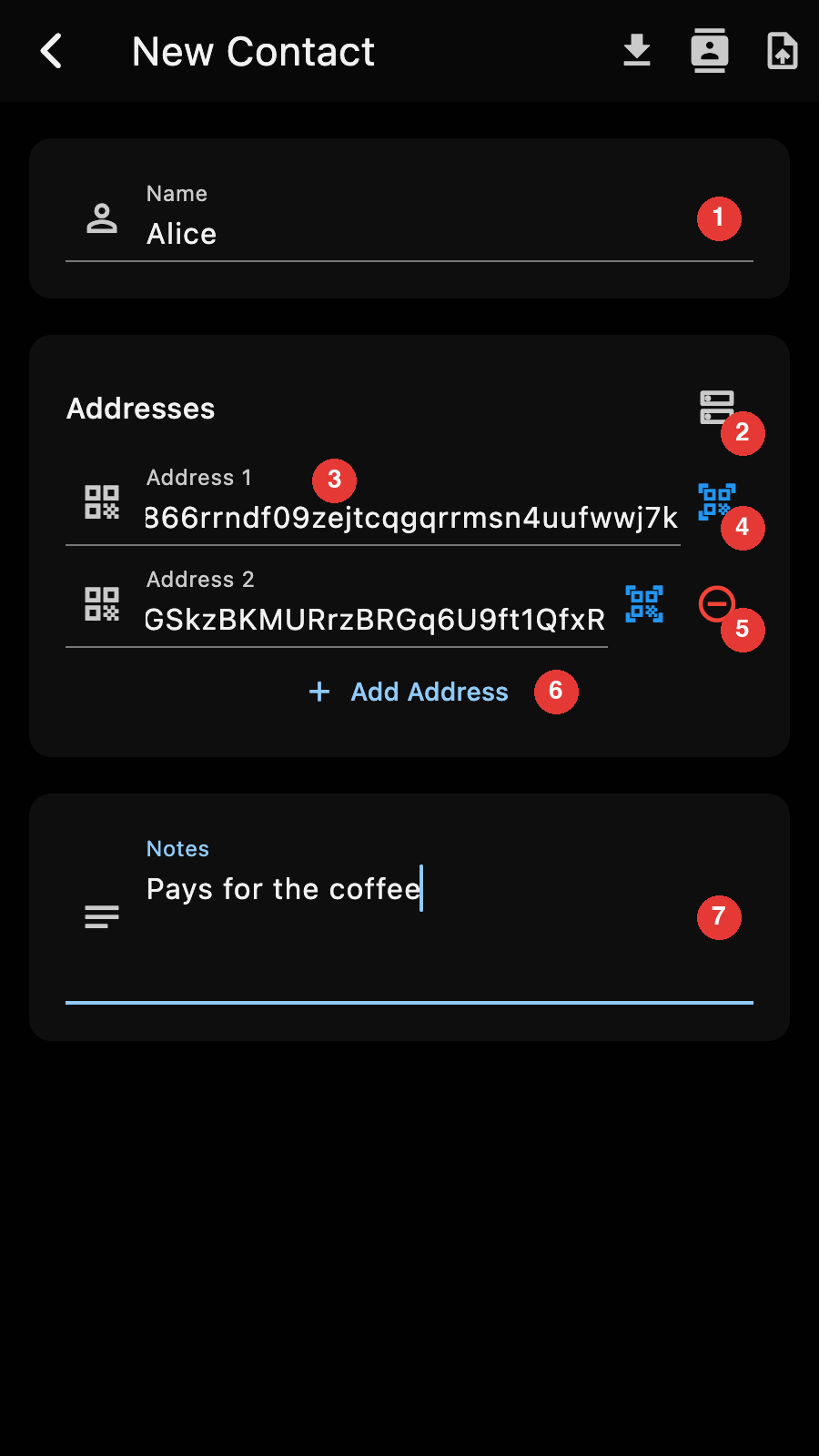
- The name. It is required and must be unique.
- Import the addresses published under an OpenAlias (see below)
- An address. Zkool accepts unified, transparent and Sapling addresses and rejects anything else.
- Scan the address from a QR code
- Remove this address. The first address has no remove button.
- Add another address
- Free text notes
There is no save button. Leaving the page with the back arrow saves the contact, and Zkool refuses to leave while the name is missing or an address is invalid. Leaving a form you have not touched saves nothing.
When you edit an existing contact, the app bar has a trash icon that deletes it after a confirmation.
Tips
The editor's app bar has the same vCard and phone import buttons as the list, but they fill the form with one contact instead of saving a batch.
Paying a contact
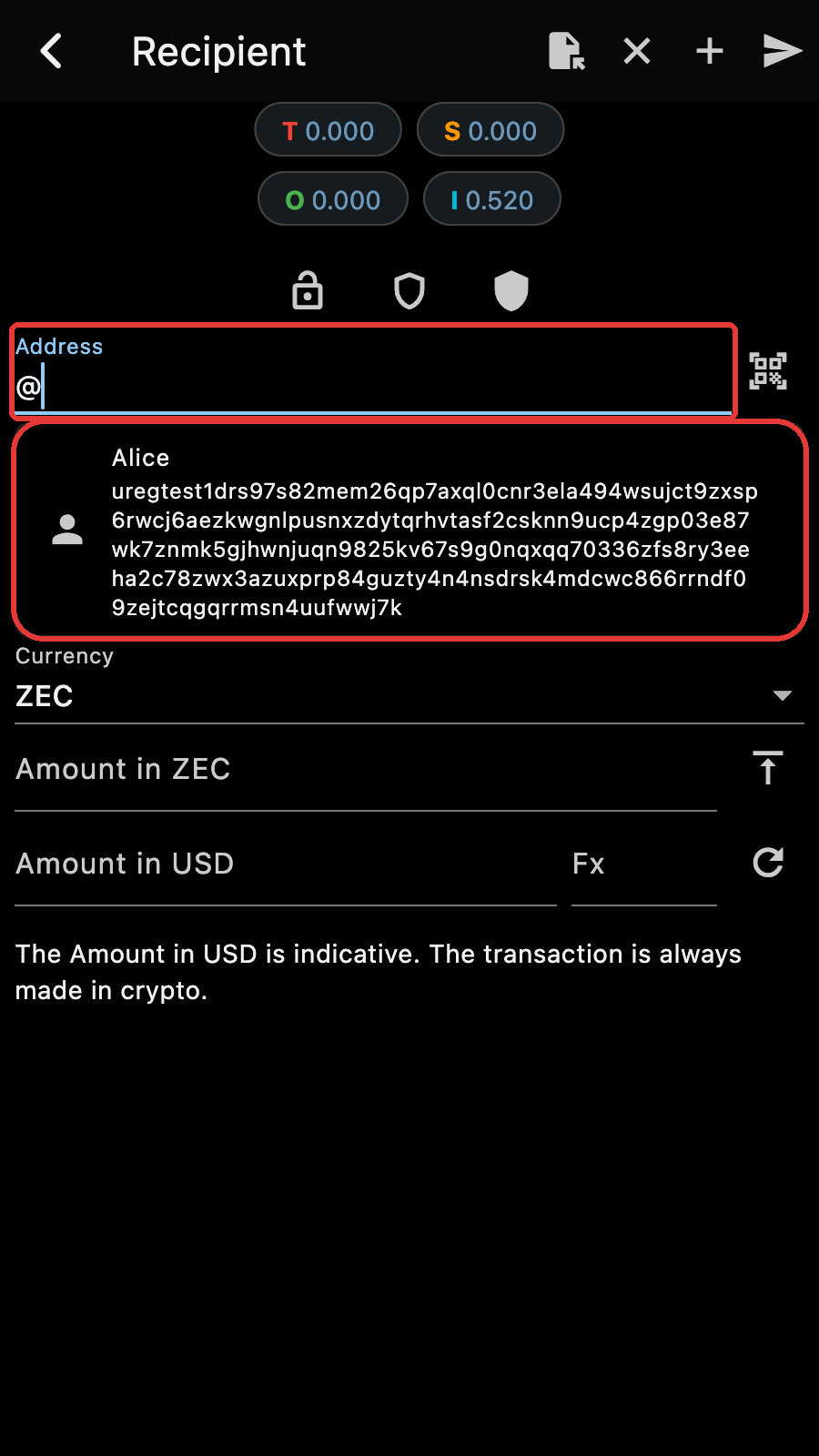
On the Send page, type @ in the address field. Zkool lists your contacts under the field, and typing more letters narrows the list by name. Tap on a contact to put its first address in the field.
You can also type the full @name and leave it. Zkool resolves it to the contact's first address when you send, and reports an unknown contact instead of sending.
Contacts in the history
A transaction to or from one of a contact's addresses shows the contact name in its row of the transaction history and in the transaction details, and the search box of the history filters by contact name.
A unified address bundles several receivers, one per pool: transparent, Sapling and Orchard. A transaction output always goes to exactly one receiver. When you pay someone, your wallet picks one receiver out of their bundle, and when someone pays you, their wallet does the same, so what a transaction records is a single receiver, never the full unified address you saved. Zkool takes this into account: a contact saved with a unified address is recognised when a transaction uses any one of its receivers, and a contact saved with a bare transparent or Sapling address is recognised when that receiver appears inside a unified address. The match is on the receiver and its pool, not on the text of the address.
vCard import and export
"Export as vCard" on the contact list writes every contact to a contacts.vcf file. The file is a standard vCard 4.0 and opens in any address book. The Zcash addresses go in the note of the card, as zcash: URIs under a label, so that other apps show them as plain text:
BEGIN:VCARD
VERSION:4.0
FN:Alice
NOTE:Pays for the coffee\n\nZcash addresses:\nzcash:u1...\nzcash:t1...
END:VCARD
"Import from vCard" reads such a file back. For each card, Zkool scans the note line by line: a zcash: URI or a bare Zcash address becomes an address of the contact, and every other line stays in the notes. Cards that carry their addresses in X-ZCASH-ADDRESS properties, as older versions of Zkool wrote them, are read too. A card without a single valid Zcash address is ignored.
When a card has the same name as an existing contact, Zkool updates that contact: the addresses of the card are added to the ones it already has, without duplicates.
To move a contact from one address book to another, write the address on its own line in the contact's notes, with or without the zcash: prefix, and export it as a vCard.
Import from the phone's contacts
On Android and iOS, "Import from Contacts" asks for access to the phone's address book and shows a picker. Zkool looks for Zcash addresses in the notes, the websites and the social media fields of each contact, and lists the contacts that have at least one. Pick the ones you want and Zkool creates them with the name, the addresses and the notes it found.
Tips
Two reasons a contact does not show up or does not import:
- iOS does not let apps read the notes of a contact, so on an iPhone the address has to be in a website or social media field.
- A contact whose name already exists in Zkool is skipped.
OpenAlias
OpenAlias publishes a payment address under a name that looks like an email address, as a DNS text record. For example, the alias hanh@methyl.cc is the record of hanh.methyl.cc:
oa1:zcash recipient_address=u14w0sxek2wnrwmtz0cg8nec2wwm39vs3r2k5x69pc2fla3ucv5ejgptfsdh2egjpfp9q2l2mfpy03ta2gueqh4t729qsu57cjzcvrwm0l;
Zkool resolves OpenAlias names in two places:
- On the Send page, type the alias with a
#prefix, as in#hanh@methyl.cc. Zkool looks it up when you send and pays the address it finds. If the record has atx_description, it becomes the memo. - In the contact editor, "Import from OpenAlias" asks for the alias and adds the addresses it finds to the contact. Keep the contact and you no longer depend on DNS for later payments.
DNS answers can be forged, so Zkool checks the DNSSEC signature of the record and reacts to what it finds:
| Status | Meaning | What Zkool does |
|---|---|---|
| verified | The domain is signed and the answer checks out | Uses the address |
| unsigned | The domain has no DNSSEC, the answer cannot be verified | Shows "DNSSEC not available" and asks whether to proceed |
| bogus | The domain is signed but the answer failed validation | Shows "DNSSEC validation failed", warns that the answer may have been tampered with, and asks whether to proceed |
Decline the bogus case: someone may be redirecting the payment. The unsigned case is common, most domains are not signed. At the time of writing, methyl.cc is one of them, so the example above shows the "DNSSEC not available" dialog.