Receiving Funds
To receive funds, you need to give one of your account addresses.
They are shown on the receive page.
From the account page, tap on the receive button on the appbar (it looks like a download icon).
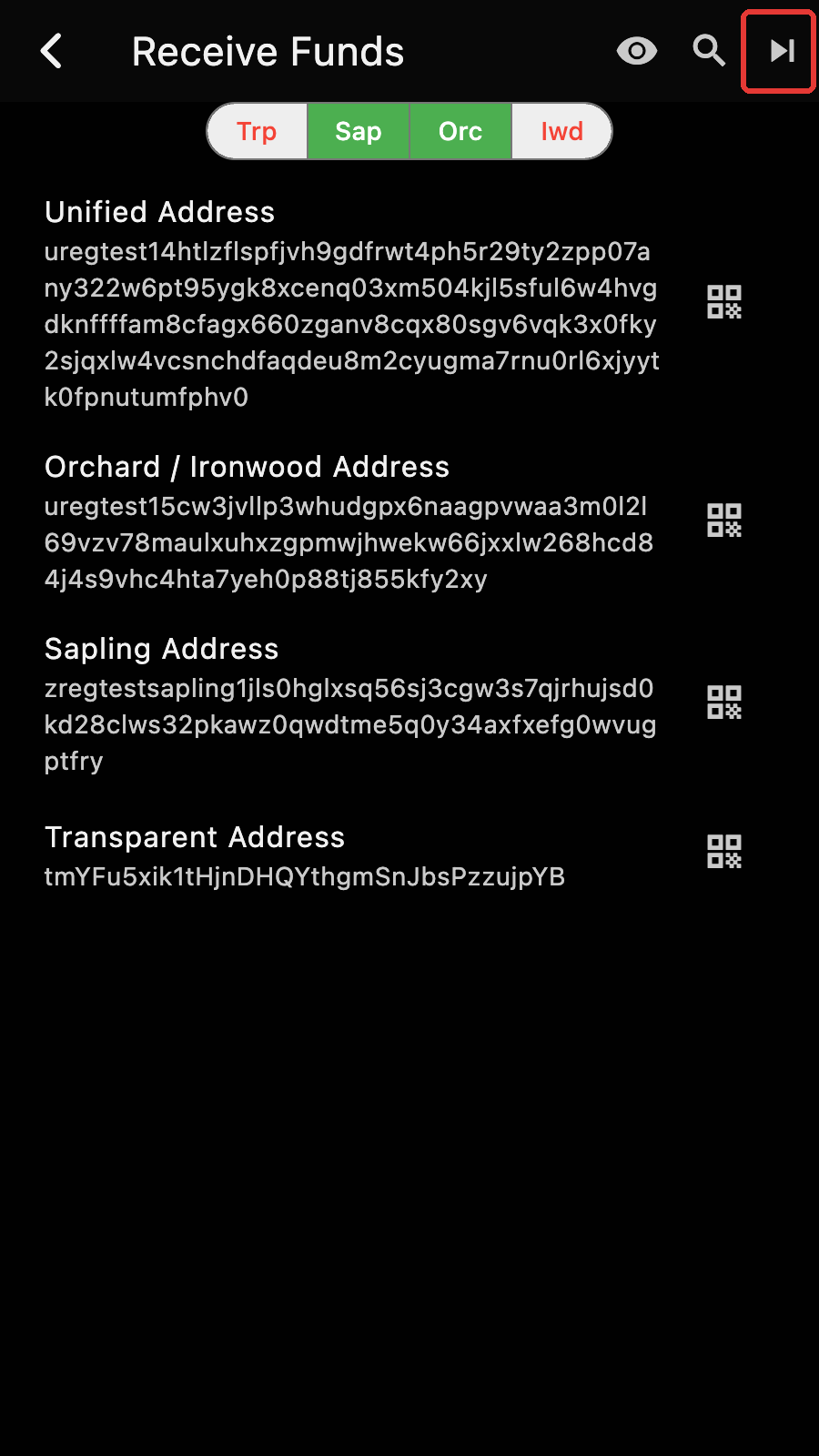
Tap on an address to copy it, or on the QR button next to it to show it as a QR code.
Funds sent to any of these addresses will be available to spend.
But wait, there are four addresses. Which address should be used?
That depends on the wallet app of the sender and what pool you want to get.
The address that begins with a t is for the Transparent pool. Using this address makes the amount and receiver (ie. you) fully public[1]. However, transparent addresses are supported by every Zcash wallet, including the multi currency wallets and the crypto exchanges.
The Sapling address and the "Orchard / Ironwood" address are shielded addresses. Using them will hide the details of the transaction. The address and the amount received are fully hidden from others[2].
Sapling is the "older" shielded technology. It has been superseded by Orchard. However, some older wallet apps may not support Orchard[3] yet. Ironwood is the next version of Orchard. It uses the same address.
And finally, there is the "Unified Address". It is a container of addresses (called receivers in this context) which can have any combination of Transparent, Sapling and Orchard (except for transparent alone). Using this address essentially means: "Here are my wallet addresses, please pick one".
The selector at the top of the page chooses which receivers the Unified Address contains.
Generally, you expect the sender app to choose the "best" address it can use, ie Orchard, but fall back to another type.
Important
A Unified Address can contain a transparent address. You should not assume that a u address is shielded only.
Wallet apps are encouraged to present a Unified Address without a transparent component.
Considering all of the above, there is little upside to using a UA that has more than Orchard:
- If the sender can use Sapling, it likely can use Orchard,
- if the sender cannot use Orchard nor Sapling, it likely cannot use UA either.
Tips
Use the "Orchard / Ironwood" address if possible. Use Transparent otherwise.
This is sufficient for most users. However, if you want more privacy, you may need to use diversified addresses.
Diversified Addresses
For simplicity, I'll assume that you are using a seed phrase and didn't exclude any pool.
You currently have a set of addresses: one for each pool. I don't count the unified address with multiple receivers since it is just a combination of the other addresses.
An account can have multiple sets of addresses. There are billions of them, all derived from the same seed phrase (and an account index). They have their own index. At 0, you have a set. Then at index 1, you have another set, and etc[4].
Tips
To generate a new set. Press the button that looks like a "play next" (in the red box).
The "eye" button on the appbar lists the addresses of the account, with filters for used/unused and external/change addresses.
The next part is about how the diversified addresses work. You can skip it if you are not interested in the details but I recommend reading it because it has some useful information about shielded and transparent address rotation.
The main thing to know is that:
All the shielded addresses (of an account) use the same decryption key.
When you receive funds at any shielded address, Zkool will be able to decrypt them and credit your account in one try.
Synchronization is a lot of trial and error. We have one key and millions of transactions. Since we don't want to reveal our decryption key, the wallet app has to try to decrypt every transaction itself and fail 99.9999% of the time because our key will not be correct since we are involved in a very small part of the global usage of Zcash[5].
So we definitively don't want to try more than one key because that would multiply the number of attempts at decryption.
The good news is that with Sapling and Orchard, the same key works with any set.
Shielded decryption looks like a master key to a building. It can unlock every door but will not work in a different building.
Transparent addresses are different. Every transparent address has its own secret key (derived from the seed phrase, account index and address index).
Transparent addresses use different decryption keys (but derived from the same seed)
Zkool monitors a few transparent addresses, but it cannot monitor all the addresses because there are billions. When you generate a new set, the wallet adds it to its pool of known addresses. This way, it will still recognize transactions that use previous addresses.
Wallet apps are expected to use indices sequentially.
For recovery, Zkool just needs to scan a range of indices and stop when it cannot find any funds after a certain number of attempts[6].
This takes time and it is not done by default.
Important
If you recover an account from a transparent Zcash wallet that uses address diversification (ie rotation) and cannot find your funds, it is likely because they are not at the expected index. Use the search button on the appbar to initiate a scan. After a while it will report the number of new addresses found and will add them to the monitoring pool. Then you need to reset the account (in the account edit page) and synchronize again from the birth height.
You do not need to do that when you create new diversified addresses in Zkool because it knows the addresses it has created[7].
Just like with Bitcoin. You are opting out of all privacy features. ↩︎
Obviously, you and the sender know the details. ↩︎
They are practically extinct by now. ↩︎
Due to some limitation of Sapling, there are indices without a Sapling address. To keep addresses in alignment, when a Sapling index is invalid, we skip the whole set, including the Transparent and Orchard parts. ↩︎
There is no way to query for our shielded transactions since this would completely defeat privacy. ↩︎
For example if there are no transaction for 50 consecutive addresses. ↩︎
But you need to scan when you restore the account on a different copy of Zkool. ↩︎